How to Choose an Automatic Barcode Label Printer
Choosing an Automatic Barcode Label Printer is rarely just a hardware decision. It affects scanning accuracy, packing speed, inventory control, and daily operating costs. A printer that performs well in a quiet office may struggle beside a busy loading dock. Dust, temperature changes, label adhesive, and constant printing can expose weaknesses quickly.
A practical evaluation should begin with your real workflow. Measure the number of labels printed each day, their dimensions, and the surfaces they must support. Check whether you need thermal transfer or direct thermal printing. Thermal transfer usually offers stronger durability for storage labels, while direct thermal printing can simplify short-term shipping tasks. Print speed matters, but so does resolution. Small barcodes, narrow margins, and dense product information require careful testing. Do not rely only on attractive specifications.
Compatibility also deserves close attention. Confirm support for your software, barcode formats, connection types, and operating systems. Ask about media availability, replacement parts, maintenance, and technical support. An experienced supplier should explain these details clearly, not hide them behind impressive performance claims. I have seen purchasing decisions focus heavily on print speed while ignoring calibration and label waste. That mistake becomes expensive over time.
The best choice depends on measurable needs, not the most advanced model. Request sample prints using your own labels and barcodes. Test them after handling, stacking, and exposure to normal workplace conditions. Review the results with warehouse staff, not only managers. Their practical feedback may reveal problems early. No selection guide is perfect, and workplace conditions change. Leave room for reassessment.
Define the Printing Requirements and Labeling Environment
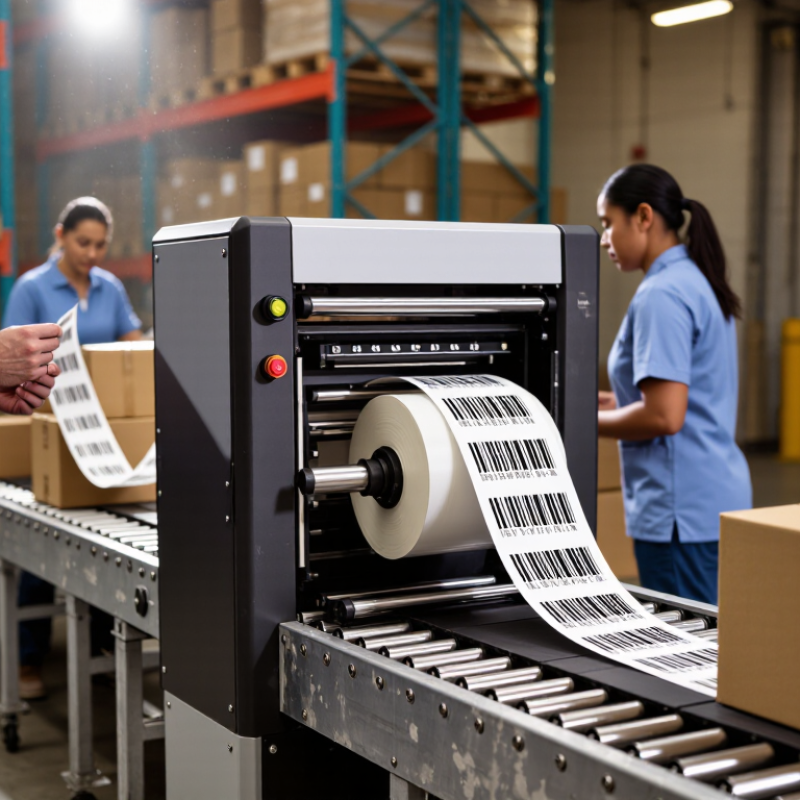
Choosing an automatic barcode label printer starts with the printing requirements, not the printer speed. Define the label size, material, barcode type, daily volume, and required print resolution. A small warehouse may need 2,000 labels daily, while a production line may print continuously for several hours. These workloads demand different duty cycles and media capacities.
Inspect the labeling environment carefully. Dust, moisture, heat, vibration, and direct sunlight can affect print quality and scanner performance. In a cold storage area, test adhesive strength on chilled surfaces. In a dusty room, protect the media path and schedule more frequent cleaning. Measure the available space, too. A printer that fits on a desk may block nearby safety access.
Consider how labels move through the workflow. Automatic application requires consistent gaps, accurate sensing, and stable label rolls. Match the printer’s resolution to the smallest barcode and text. Then test real samples, not only digital designs. I once trusted a sharp screen preview, but the printed barcode failed after exposure to condensation. That mistake changed my testing process.
Set practical checks for calibration, ribbon or ink use, replacement parts, and operator training. Keep records of failed labels and their causes. Some failures come from poor settings rather than hardware. Allow room for that uncertainty. A reliable choice should perform under actual conditions, with ordinary staff, changing media, and occasional human error.
Evaluate Label Materials, Resolution, Speed, and Media Compatibility
Choosing an automatic barcode label printer starts with the label, not the machine.
Material affects adhesion, scan quality, and service life. Paper suits dry indoor shelves and short-term cartons. Synthetic stock handles moisture, abrasion, and chilled surfaces better. A label that curls on a cold container can ruin an otherwise accurate print. Test the adhesive on the real surface for 24 hours. This small trial often reveals more than a specification sheet. I have seen durable labels fail because the carton coating was dusty. That detail is easy to miss.
Resolution should match barcode density and the smallest text.
Standard resolution works for many shipping labels, while finer output helps tiny codes and graphics. Higher resolution is not automatically better. It can increase cost and expose poor label alignment. Print speed must fit the scanning workflow. A fast printer is wasteful if operators constantly reload rolls. Measure actual output, including pauses, calibration, and cutter time. Media compatibility also matters. Check roll width, core size, outside diameter, gap sensing, black marks, and continuous media settings. Some machines accept many formats, but inconsistent stock can trigger skipped labels. That has happened in practical testing.
Tips:
Print a test batch before purchase. Use the intended ribbon or direct thermal setting. Scan labels after storage, rubbing, and temperature changes. Record misprints, jams, and unreadable bars. Then question the result. A supplier’s claim is useful, but your own samples are stronger evidence. Leave room for error. Real warehouses are rarely as clean or steady as demonstrations.
Check Software, Connectivity, Integration, and Maintenance Features
When choosing an automatic barcode label printer, inspect its software before its print speed. During warehouse trials, I test template creation, barcode validation, user permissions, and revision history. A fast printer cannot fix a wrong product code. Look for software that supports common barcode standards and exports clear error messages. Role-based access matters too. It limits accidental changes. The 2024 MHI Annual Industry Report found that 55% of supply-chain leaders expect to adopt robotics and automation within five years. That trend increases the need for dependable labeling software.
Connectivity should match your actual workflow. Ethernet suits fixed packing stations, while Wi-Fi supports mobile carts and changing work areas. USB remains useful for controlled setup. Check for application programming interfaces, print queues, and compatibility with warehouse, enterprise, and manufacturing systems. The 2024 Smart Manufacturing and Operations Survey reported that 86% of manufacturers view smart manufacturing as important for competitiveness. Integration is not optional anymore. Still, compatibility claims can be vague. Request a live test with your own label format and database.
Maintenance features often decide long-term costs. Choose accessible printheads, replaceable rollers, media sensors, status alerts, and remote diagnostics. Ask how cleaning schedules are recorded. Ask whether spare parts are locally available. In my experience, small calibration problems create more waste than dramatic failures. A perfect maintenance plan is unrealistic. Operators miss steps. Build reminders into the software, and keep a simple paper backup for unexpected outages.
How to Choose an Automatic Barcode Label Printer
Software, connectivity, integration, and maintenance verification checklist
This vendor-neutral checklist summarizes practical verification points before purchase. Check software compatibility and label-design functions, confirm the required wired or wireless connections, validate integration with business systems and printer languages, and review maintenance access, calibration, cleaning, and diagnostics.
Select the Best Printer Through Cost, Reliability, and Scalability Analysis
How to Choose an Automatic Barcode Label Printer
Choosing an automatic barcode label printer requires more than comparing purchase prices. Analyze total cost over three to five years. Include labels, ribbons, electricity, software, maintenance, and replacement parts. A cheaper unit may create higher costs through frequent jams or slow output. Calculate cost per usable label, not cost per machine. Downtime is expensive. Ask suppliers for service response times, spare-part availability, and preventive maintenance requirements. These details often reveal more than a product brochure.
Reliability depends on the working environment. Check the printer’s duty cycle, print speed, resolution, and media tolerance. A warehouse with dust, temperature changes, and continuous shifts needs sturdy components. Test small and large label formats before approval. Confirm barcode quality with a verifier, especially for dense codes or small text. In my experience, teams sometimes trust a successful one-hour demonstration too quickly. A longer trial exposes ribbon wrinkles, sensor errors, and adhesive buildup. That weakness deserves attention.
Scalability should guide the connection and control strategy. Select interfaces that support current systems and future software changes. The printer should handle higher order volumes without major redesign. Consider remote monitoring, user permissions, automatic alerts, and simple configuration backups. Standardized label templates can reduce training time across multiple sites. Leave room. Yet, planning for unlimited growth can waste capital. Estimate realistic volume increases, then compare expansion costs with buying additional units. A practical decision balances today’s budget with tomorrow’s workload, while documenting assumptions that may later prove wrong.

 +86 15921716191
 Contact Phone
 Contact Email