+86 15921716191


Manual Weigh-Price Labelling Machines combine weighing, price calculation, and label printing at one workstation. An operator places a product on the platform, selects or checks its item code, and prints a label showing details such as weight and price. The process is direct. It is also sensitive to setup.
For butcher counters, produce departments, and small food processors, these machines can support variable-weight products without a fully automated line. PMMI’s 2024 State of the Industry report examines packaging machinery investment and operational pressures across the sector. Its findings offer useful context: equipment choices must fit real production needs, not just advertised speed. USDA Economic Research Service food-price reporting adds another consideration. The agency reported that U.S. food-at-home prices rose 1.2% in 2024, highlighting why accurate unit pricing matters to retailers and shoppers. Those figures do not measure labelling-machine performance, however. That distinction matters.
This guide explains how Manual Weigh-Price Labelling Machines work, what their main components do, and where manual operation makes sense. It also considers label formats, weighing capacity, print clarity, and routine checks. A clear label starts with a stable reading. A rushed operator can still choose the wrong product code, so training and simple verification steps remain important. Manual equipment is not automatically the best fit. Small-volume sites may value flexibility, while busier operations may need faster workflows or stronger integration. The right choice depends on products, staff, and daily output—not a brochure promise.
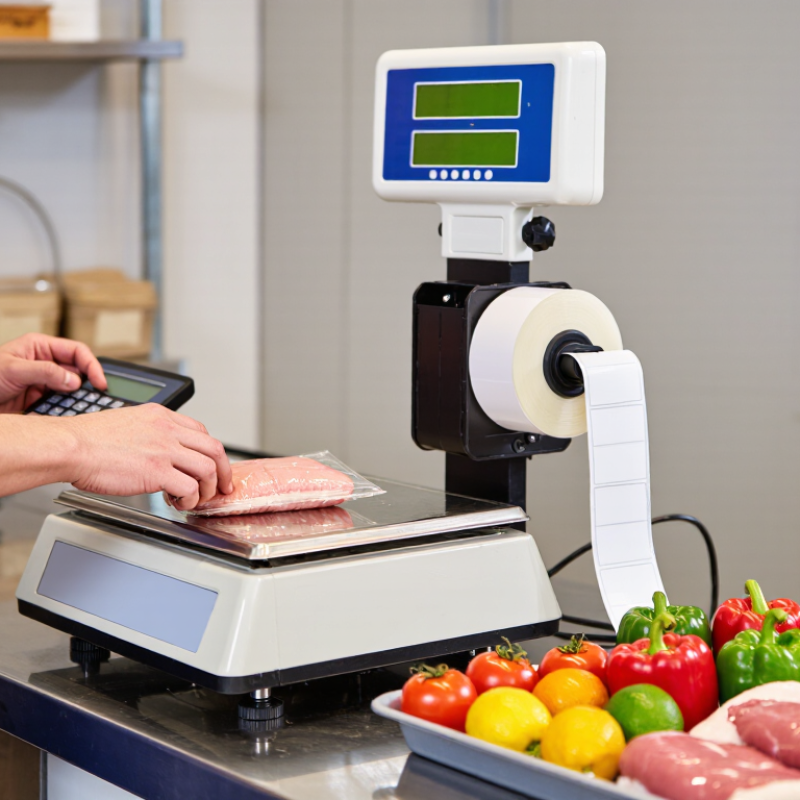
A manual weigh price labelling machine combines a weighing scale, price calculation, and label printing in one operator-controlled process. The user places an item on the platform, selects its product information, and lets the machine calculate the price from its weight and unit price. It then prints a label showing details such as the product name, weight, and total price. Depending on the setup, a barcode may also be included.
The word “manual” matters. An operator positions each item, checks the reading, and applies the label by hand; the machine does not automatically move products along a conveyor. No conveyor is required. This format can suit small food counters, market stalls, and back-room packing areas where batches are modest and products vary in size. A damp container or a product resting against the platform can affect the reading, so staff need to keep the weighing surface clear and use the tare function when appropriate.
The equipment is straightforward, but not foolproof. During a rush, selecting the wrong product entry is easy, and hand-applied labels may sit crooked or cover useful packaging details. Regular checks of the scale and label settings help keep printed prices consistent. In practice, it can feel a little slow when many items need labelling at once; that trade-off is worth considering before choosing a manual workflow.

A manual weigh price labelling machine combines a scale, price calculator, operator controls, and label printer. The product sits on a stainless-steel platform, where a load cell converts its weight into an electrical signal. An indicator displays the weight, while stored product codes link each item to its selling price per kilogram. The machine multiplies weight by unit price, then prints details such as product name, net weight, price, and barcode. The operator selects the correct code and checks the label before applying it.
The scale is the foundation. OIML R 76-1 lists up to 10,000 verification scale intervals for class III instruments; this is a technical capacity, not a guarantee of accuracy in every installation. A stable, level counter matters. So does routine checking with suitable test weights. Small errors add up. A slightly tilted platform or residue beneath it can affect readings, and staff may overlook this during a busy shift.
The control panel typically includes a numeric keypad, product-code keys, tare functions, and print controls. A thermal printer applies heat to coated label stock, avoiding ink cartridges and keeping output quick. Its print quality still depends on clean printheads and compatible labels. One weak point is incorrect product-code selection: the machine can calculate perfectly and still print the wrong price. GS1’s barcode guidance supports consistent product identification, but operators should verify that local checkout systems can read the printed code.
A manual weigh-price labelling machine combines a scale, a price calculation, and a label printer in one counter workflow. The operator places the product on the platform, enters its unit price, and waits for the weight to settle. The machine multiplies net weight by the price per unit, then prints a label showing details such as weight, unit price, and total price. For loose produce, a tare setting removes the container’s weight before the calculation. Small differences matter.
NIST Handbook 44, Table 6, gives Class III scales an acceptance tolerance of ±0.5 scale division and a maintenance tolerance of ±1 division within the first 500 divisions. The exact requirements depend on the scale’s classification and local metrology rules, so operators should check the device documentation and applicable requirements. In practice, keep the platform clear, confirm the display returns to zero, and test with a suitable reference weight. A label may look perfectly clear even when the tare is wrong. That is an easy detail to miss. Periodic checks help catch drift, while clean rollers and correctly loaded label stock help prevent smudged or incomplete prints. A manual machine still relies on careful entry and handling; automation does not remove every source of error.
A manual weigh price labelling machine weighs variable-weight goods and prints a price label after staff select the correct product entry. Grocery teams use it for loose produce, cheese, meat, bakery items, and prepared foods. A worker places the item on the scale, enters its product code, then applies the printed label to a tray or bag. The label can show weight, unit price, total price, and product details. The workflow is simple. But accuracy depends on staff choosing the right code and keeping product settings current.
Small grocers, butcher counters, bakeries, and deli departments use these machines to price items consistently at the counter. Labels also help cashiers identify products and help staff rotate dated goods. They do not, by themselves, prevent waste or guarantee freshness. USDA estimates that 30–40% of the U.S. food supply is lost or wasted, according to its Food Loss and Waste overview. That broad figure is not proof that labelling machines reduce waste; clear dates and dependable stock routines still matter. Staff should also check scale accuracy, keep the weighing surface clean, and replace label rolls before a busy service period. A missed setup step can create incorrect prices.
A manual weigh-price labelling machine combines a weighing scale with a label printer. An operator places each product on the platform, selects or enters its unit price, and prints a label showing the calculated price. The process suits small shops, market stalls, and packing rooms with modest daily volumes. Setup is usually straightforward, and staff can weigh items individually without investing in a fully automated line. That can be useful when products vary in size or packaging.
The main advantage is control. Operators can check each item before printing, which helps catch a misplaced tray or an incorrect product selection. The compact design also fits on a counter, beside a cutting board, or near a packing station. But every item still needs hands-on attention. During busy periods, weighing, entering details, and applying labels can create a queue. Small entry mistakes matter. A wrong unit price or unstable scale reading can produce a misleading label, so regular checks and careful handling are essential. The workflow may also feel slow when staff must switch frequently between products. In practice, it helps to keep common product settings clear and the weighing surface clean; even then, interruptions can lead to errors.
| Dimension | Practical Details | Key Advantages | Practical Limitations |
|---|---|---|---|
| Basic function | An operator places an item on a weighing platform. The system uses the measured weight and a selected price per unit of weight to calculate the item price, then prints a label. | Combines weighing and price calculation in one workflow, reducing the need for separate manual calculations. | Exact functions vary by machine configuration; some models require the operator to select or enter product information for each item. |
| Typical workflow | Select the product or price setting, weigh the item, print the label, and apply it by hand. | Simple to understand and adaptable to products that vary in weight, such as fresh foods sold by weight. | Weighing, label application, product handling, and replenishment remain operator tasks. |
| Price calculation | The item price is generally calculated from weight multiplied by the configured price per unit of weight. | Automatic calculation helps avoid arithmetic errors when the correct product and price settings are selected. | Incorrect product selection, outdated pricing, or an incorrect unit-price setting can produce an incorrect label. |
| Label information | Depending on the setup, a label may include weight, unit price, total price, product description, date information, or a barcode. | Provides shoppers and checkout systems with useful item information in a compact format. | Label content and format must be configured to meet business needs and applicable local requirements. |
| Advantages for operations | Can suit counters or work areas where products are weighed and labelled individually in batches or as needed. | Generally offers a straightforward process and can be a practical choice where fully automatic packaging and labelling are unnecessary. | Output depends on operator pace, product handling, and the time needed to select items and apply labels. |
| Production capacity | Throughput depends on the machine design, label-printing speed, product type, and operator workflow. | Can provide a flexible option for variable-weight items and changing product mixes. | Manual handling can become a bottleneck in high-volume workflows; capacity should be assessed using actual products and tasks. |
| Accuracy and verification | Reliable results depend on correct settings, suitable placement of the product on the scale, and regular checks of weighing and printing functions. | Integrated weighing and calculation can support consistent pricing when the system is correctly configured and maintained. | For trade use, the weighing instrument may need to meet local legal-metrology requirements. Applicable rules vary by jurisdiction. |
| Product and label handling | The operator positions the product for weighing and applies the printed label to the package or item. | Works with a range of item shapes and package types when the weighing surface and label format are suitable. | Irregular, fragile, wet, or awkwardly packaged items may take longer to handle or label consistently. |
| Cleaning and maintenance | Scale surfaces, printer components, and surrounding work areas require care appropriate to the operating environment. | A manual workstation can be accessible for routine inspection and cleaning, depending on its design. | Cleaning methods and service needs differ by model. Food-contact and washdown suitability should be confirmed before purchase. |
| Best-fit applications | Often considered for retail counters, market stalls, small packing areas, and other settings that label variable-weight products individually. | Useful when flexibility and operator control are more important than unattended, high-speed processing. | May be less suitable when the process requires continuous automated weighing, printing, and label application at high throughput. |